How Big Is a MacBook Air? Size Compared to Everyday Items
Closest match: US dollar bill is 0.51× MacBook Air 13-inch.
Quick compare: US dollar bill 0.51× · Standard office desk 4.61×
Apple markets the MacBook Air as impossibly portable, but honestly, a screen-size number on its own doesn’t tell you much. “13-inch” or “15-inch” sounds simple until you try to picture whether the thing will actually fit in your bag. The current 13-inch model comes in at roughly 12 inches wide and 8.46 inches deep, and the 15-inch version stretches out to 13.40 by 9.35 inches.
So if you’re trying to figure out how big a MacBook Air really is, the honest answer is: it depends which size you’re talking about. Below you’ll find the exact measurements for both current models, their metric conversions, and a handful of everyday comparisons that make the numbers easier to picture.
Quick Answer: How Big Is a MacBook Air?
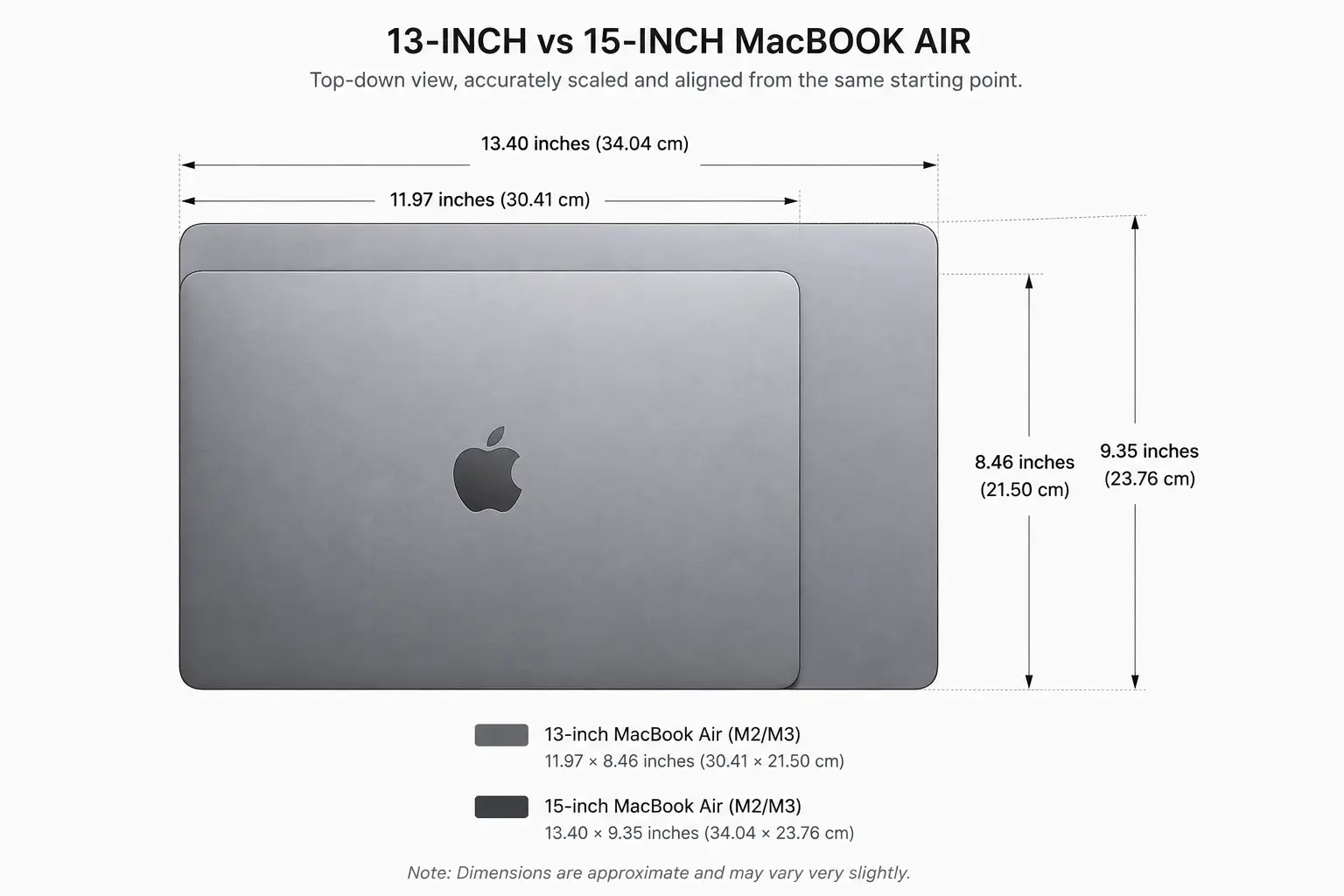
The 13-inch MacBook Air measures 11.97 inches wide × 8.46 inches deep × 0.44 inch thick (that’s 30.41 × 21.5 × 1.13 cm). The 15-inch model comes in at 13.40 × 9.35 × 0.45 inches, or 34.04 × 23.76 × 1.15 cm. Worth remembering: the “13-inch” and “15-inch” labels describe the display’s diagonal measurement, not how wide the laptop actually is.
MacBook Air Dimensions at a Glance
| Model | Width | Depth | Thickness | Display |
|---|---|---|---|---|
| MacBook Air 13-inch | 11.97 in (30.41 cm) | 8.46 in (21.5 cm) | 0.44 in (1.13 cm) | 13.6 in diagonal |
| MacBook Air 15-inch | 13.40 in (34.04 cm) | 9.35 in (23.76 cm) | 0.45 in (1.15 cm) | 15.3 in diagonal |
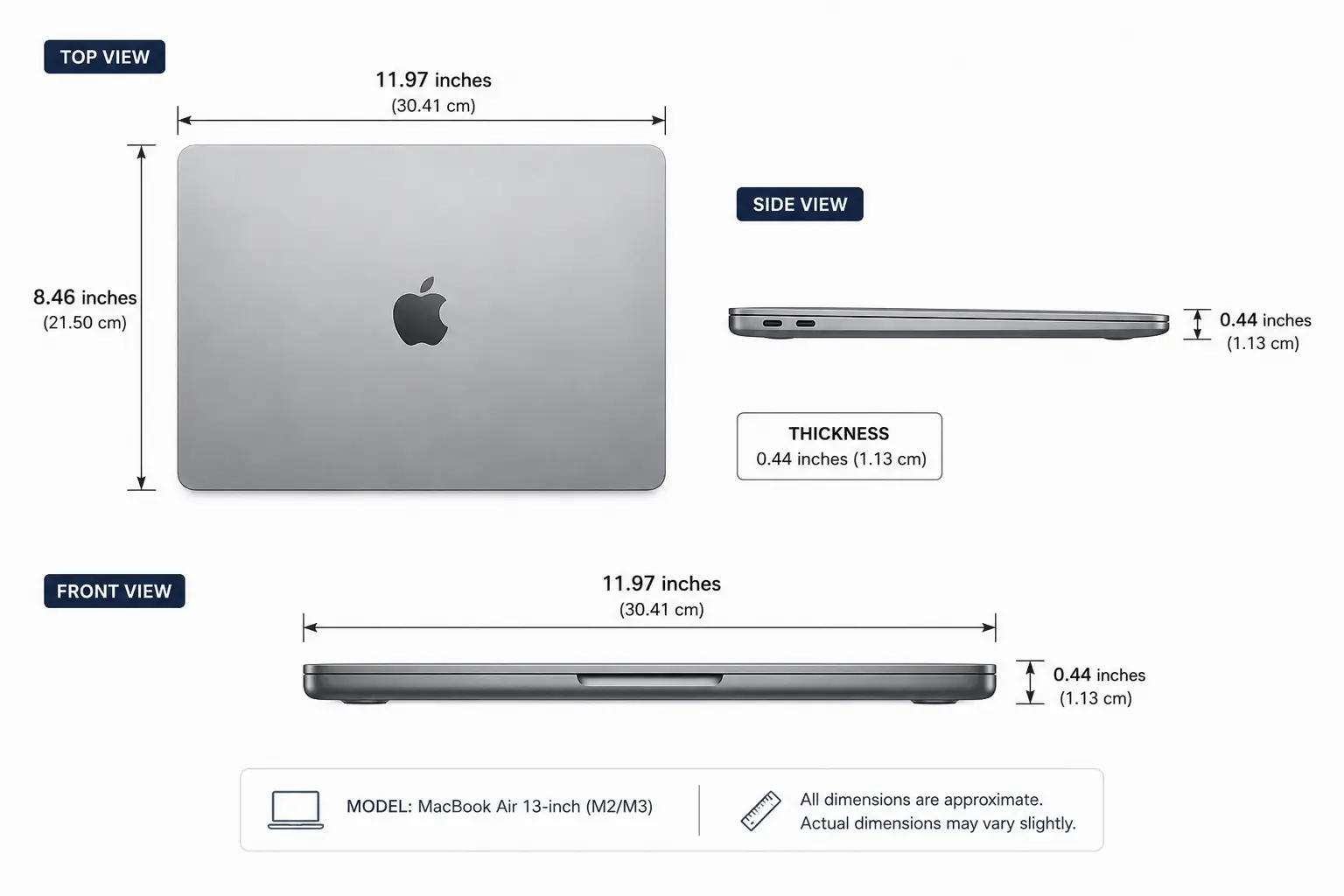
These numbers come straight from Apple’s published specs: the 13-inch Air sits at 11.97 inches wide, 8.46 inches deep, and 0.44 inch thick, while the 15-inch model is 13.40 inches wide, 9.35 inches deep, and 0.45 inch thick.
Interestingly, thickness barely changes between the two. What actually grows is the footprint the 15-inch Air just takes up more table space.
What Does a MacBook Air Look Like in Size?
Picture a thin rectangle roughly the size of a large sheet of paper that’s the easiest mental shortcut, though the exact dimensions shift depending on which model you’re picturing.
The 13-inch Air’s footprint works out to about 12 × 8.5 inches. Its width falls just three-hundredths of an inch short of a clean 12 inches, and the depth lands a touch over 8.4 inches.
Bump up to the 15-inch model and that footprint grows to roughly 13.4 × 9.35 inches.
That difference actually matters in practical terms whether it’ll slide into a backpack pocket, a laptop sleeve, a desk drawer, or some other tight space you’re trying to squeeze it into.
13-Inch vs. 15-Inch MacBook Air Size
The cleanest way to compare the two current models is side by side, closed:
| Measurement | 13-inch Air | 15-inch Air | Difference |
|---|---|---|---|
| Width | 11.97 in | 13.40 in | 1.43 in |
| Depth | 8.46 in | 9.35 in | 0.89 in |
| Thickness | 0.44 in | 0.45 in | 0.01 in |
The 15-inch model is 1.43 inches wider and 0.89 inch deeper but just 0.01 inch thicker. So Apple didn’t really make the bigger laptop bulkier to fit the larger screen; nearly all of that extra size shows up in the footprint, not the thickness.
8 Everyday Comparisons That Help Visualize a MacBook Air
Screen-size numbers only get you so far. Comparing the laptop’s actual footprint to things you already own tends to work better.
1. A US Letter Sheet of Paper
A Letter sheet is 8.5 × 11 inches. The 13-inch MacBook Air, at 11.97 × 8.46 inches, lands remarkably close to that about 0.97 inch wider on the long side, and nearly identical on the short side. Not a perfect match, but close enough that a sheet of paper on your desk gives you a decent sense of the laptop’s footprint.
Comparison: Very close.
2. An A4 Sheet of Paper
A4 measures 8.27 × 11.69 inches. The 13-inch Air runs about 0.28 inch wider and 0.19 inch deeper than that so it’s a shade bigger than a sheet of A4, but not by much.
Comparison: Very close.
3. A Standard Placemat
Placemats vary a lot in size, so this comparison only really works if you check the specific dimensions of yours. Most are noticeably bigger than a 13-inch Air set the closed laptop on top and you’ll see it only covers part of the mat. Handy if you’re trying to plan out desk or dining-table space.
Comparison: Variable.
4. A Large Hardcover Book
Big hardcovers think somewhere around 9 × 12 inches land in the same ballpark as the 13-inch Air. It’s not an exact match, but the shared rectangular shape makes the size difference easy to picture at a glance.
Comparison: Approximate.
5. A Small Laptop Sleeve
Sleeves are built around specific device sizes, which makes them a useful reference with a catch. They include padding and clearance, so a sleeve’s outer dimensions will run a bit larger than the actual laptop inside it. Don’t mistake sleeve size for MacBook size.
Comparison: Approximate and model-dependent.
6. A Compact Desk Mat
Set a 13-inch Air on a desk mat and you’ll get a clear visual sense of how much surface it actually occupies the mat’s dimensions, once you know them, make this an easy comparison to eyeball.
Comparison: Variable.
7. A Letter-Size Clipboard
Built around the 8.5 × 11-inch paper format, with a little extra room around the edges. That makes it a decent stand-in for the 13-inch Air’s footprint close, though not identical, since clipboard designs vary by manufacturer.
Comparison: Very close to approximate, depending on the clipboard.
8. A Medium Serving Tray
The 13-inch Air covers roughly 101 square inches. A tray with a similar footprint gives you a tangible, physical sense of how much space the laptop actually takes up though tray sizes are all over the place, so treat this as a rough visualization rather than a standard.
Comparison: Variable.
How Big Is a MacBook Air in Centimeters?
For anyone working in metric, the 13-inch MacBook Air measures:
- 30.41 cm wide
- 21.5 cm deep
- 1.13 cm thick
And the 15-inch model:
- 34.04 cm wide
- 23.76 cm deep
- 1.15 cm thick
So roughly 30.4 × 21.5 cm for the smaller model, and 34.0 × 23.8 cm for the larger one.
MacBook Air Size in Millimeters
| Model | Width | Depth | Thickness |
|---|---|---|---|
| 13-inch | 304.1 mm | 215 mm | 11.3 mm |
| 15-inch | 340.4 mm | 237.6 mm | 11.5 mm |
These are just the centimeter figures converted directly.
How Big Is the MacBook Air Screen?
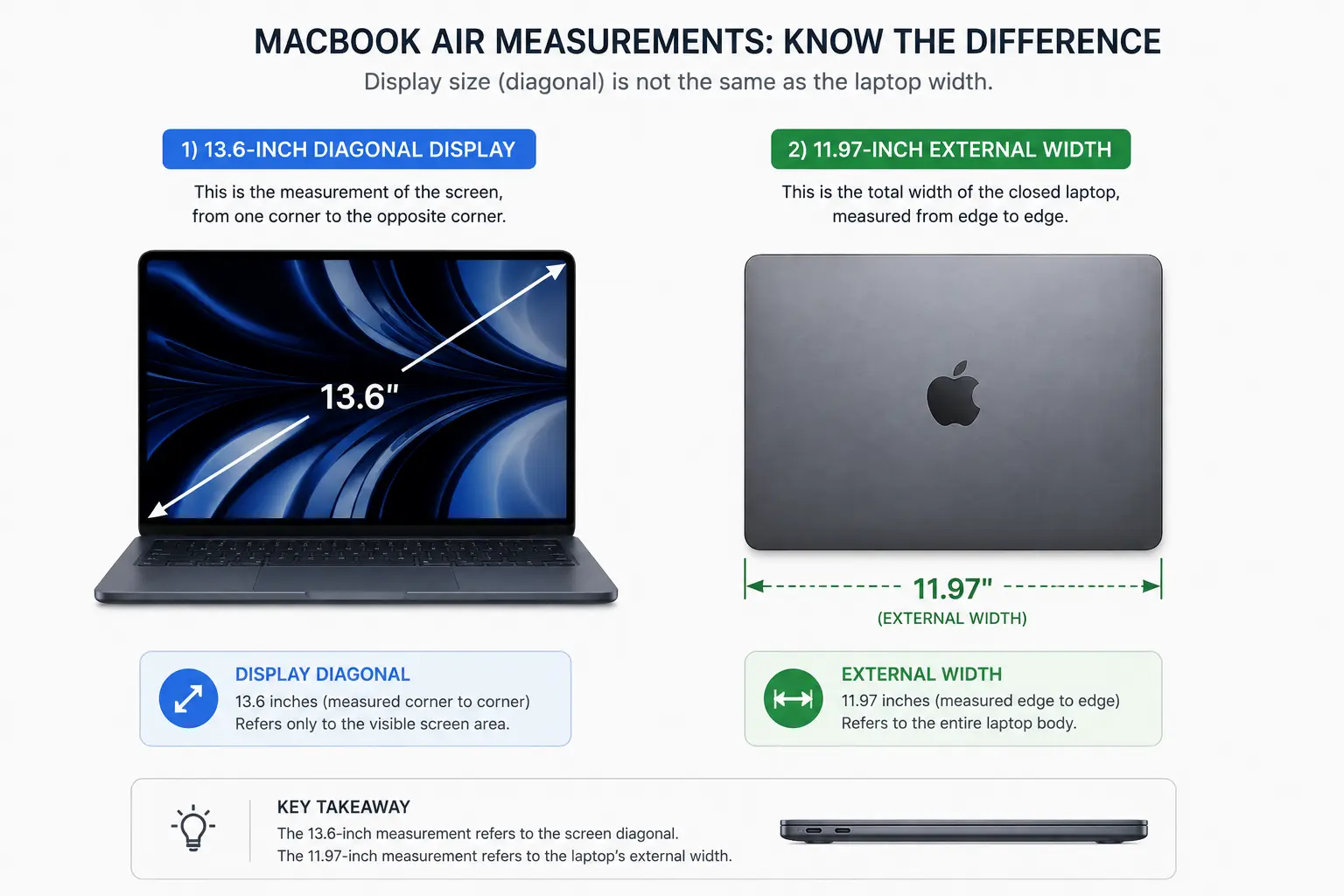
Here’s where a lot of people get tripped up the screen-size number isn’t the laptop’s width. The 13-inch model actually has a 13.6-inch diagonal display, and the 15-inch model’s display measures 15.3 inches diagonally.
So “13-inch” and “15-inch” are describing the screen’s diagonal, not how wide the laptop is when you set it on a table. It’s a small distinction, but it matters if you’re shopping and assuming a bigger screen number automatically means a bulkier machine — it doesn’t.
How Much Desk Space Does a MacBook Air Need?
Closed, the 13-inch Air’s footprint is about 11.97 × 8.46 inches roughly 101.2 square inches of surface area.
The 15-inch model needs about 13.40 × 9.35 inches, or around 125.3 square inches.
Both figures come straight from Apple’s published width and depth specs. In real use, though, you’ll want extra room around the laptop itself for your hands, a mouse, cables, whatever else lives on your desk. The footprint alone undersells how much space you actually need to work comfortably.
Which MacBook Air Is Smaller?
No contest the 13-inch model is smaller in both width and depth: 11.97 × 8.46 inches versus 13.40 × 9.35 inches for the 15-inch. Both are thin regardless, at 0.44 inch and 0.45 inch respectively.
If you care most about portability, go 13-inch. If you’d rather have the bigger screen and don’t mind carrying a slightly larger footprint, the 15-inch barely costs you anything in thickness.
Does MacBook Air Size Include the Screen?
No and this trips people up constantly. The physical dimensions describe the whole closed laptop; the screen-size number is just the display’s diagonal. The 13-inch Air, for instance, is 11.97 inches wide on the outside but carries a 13.6-inch diagonal screen. Two completely different measurements. Don’t use “13 inches” as a stand-in for the laptop’s actual width.
Does MacBook Air Size Vary by Model?
Yes, and this one catches people off guard too. Apple has changed the Air’s physical dimensions across generations — the current lineup is 13-inch and 15-inch, but older versions included an 11-inch model and a differently sized 13-inch design. (Cover-Up’s model guide and EveryMac both document this generational shift in detail.)
Case in point: the old Intel-era 13-inch Air measured about 12.8 × 8.94 inches — noticeably chunkier than today’s 11.97 × 8.46 inch design.
So if you’re shopping for a sleeve, case, or skin for an older Air, don’t just go by “13-inch” — check the exact model number.
How to Check Which MacBook Air You Have
The model identifier is a more reliable way to figure out exactly which MacBook Air you own than relying on screen size alone. Cover-Up notes that this A-number the letter A followed by four digits is printed on the underside of the machine, and their guide maps it to each generation.
This matters because two laptops both labeled “13-inch” can still have completely different outer dimensions. When buying a case or sleeve, match the exact model rather than assuming.
MacBook Air vs. MacBook Pro: Why Size Alone Isn’t Enough
A MacBook Air and a MacBook Pro can share a similar screen-size label while having different actual footprints. The 13-inch Air at 11.97 × 8.46 inches doesn’t necessarily line up with a Pro model in the same size class.
Bottom line: never assume a “13-inch laptop” has some universal width or depth. Always check the specific model.
Common Mistakes When Comparing MacBook Air Dimensions
Mistake 1: Treating the screen size as the laptop’s width — A 13.6-inch display doesn’t mean an 13.6-inch-wide laptop.
Mistake 2: Forgetting the 15-inch exists — “How big is a MacBook Air” doesn’t have one answer anymore; there are two current sizes.
Mistake 3: Assuming all 13-inch Airs are identical — Older generations had different chassis dimensions entirely.
Mistake 4: Using sleeve dimensions as laptop dimensions — Sleeves need clearance and padding, so they’ll always run a bit bigger.
Mistake 5: Forgetting thickness matters too — Width and depth are what count for desk space, but thickness becomes the deciding factor for backpacks, drawers, or tight compartments.
Frequently Asked Questions
How big is a 13-inch MacBook Air? 11.97 inches wide, 8.46 inches deep, 0.44 inch thick — or 30.41 × 21.5 × 1.13 cm.
How big is a 15-inch MacBook Air? 13.40 inches wide, 9.35 inches deep, 0.45 inch thick — or 34.04 × 23.76 × 1.15 cm.
What are the dimensions of a 13-inch MacBook Air in cm? 30.41 cm wide × 21.5 cm deep × 1.13 cm thick.
Is a MacBook Air the same size as A4 paper? Close, but not exact. A4 is 8.27 × 11.69 inches; the 13-inch Air is 11.97 × 8.46 inches — slightly bigger in both directions.
Is a MacBook Air the same size as Letter paper? Very close. Letter paper is 8.5 × 11 inches, and the Air is 11.97 × 8.46 inches.
How thick is a MacBook Air? 0.44 inch (1.13 cm) for the 13-inch model; 0.45 inch (1.15 cm) for the 15-inch.
Is the 13-inch or 15-inch MacBook Air bigger? The 15-inch — 13.40 × 9.35 inches versus 11.97 × 8.46 inches.
Does every 13-inch MacBook Air have the same dimensions? No. Older generations were physically larger than the current design.
Final Takeaway
If you’re trying to actually picture a MacBook Air’s size, start with the 13-inch model: 11.97 × 8.46 × 0.44 inches basically a large sheet of paper, just a touch bigger than Letter or A4. The 15-inch jumps up considerably in width and depth (13.40 × 9.35 inches) while the thickness barely budges about a hundredth of an inch.
The one thing worth remembering through all of this: screen size and physical size are not the same measurement. A “13-inch MacBook Air” tells you about the display category, not the laptop’s actual width. If you’re buying a case, sleeve, or bag, always go by the exact model’s published dimensions not the marketing number.